스파르타 Unity 1기
스파르타 Unity 8기 3일차 TIL
정주찬
2023. 8. 9. 19:54
구현한 것들
간단한 오브젝트 풀링을 구현하여 터치 이펙트와 카드 파괴 이펙트를 구현하였다.
using System.Collections;
using System.Collections.Generic;
using UnityEngine;

public class ObjectPooler : MonoBehaviour
{
    public static ObjectPooler I;

    [Header("Pools")]
    public ObjectPool<TouchParticle> touchPool;
    public ObjectPool<Explosion> explosionPool;


    void Awake()
    {
        I = this;

        // 터치 이펙트 풀
        TouchParticle touchPrefab = Resources.Load<TouchParticle>("TouchParticle");
        touchPool = new ObjectPool<TouchParticle>(touchPrefab, transform, 10);

        // 카드 폭발 풀
        // 폭발은 그냥 생성 파괴 해도 될 수도? - 갯수가 얼마 없음
        Explosion explosionPrefab = Resources.Load<Explosion>("Explosion");
        explosionPool = new ObjectPool<Explosion>(explosionPrefab, transform, 4);

    }
}
using System.Collections;
using System.Collections.Generic;
using UnityEngine;
public class ObjectPool<T> where T : MonoBehaviour, IPoolable<T>
{
[Header("풀링 프리펩")]
T tPrefab;
[Header("스택 풀")]
Stack<T> objectPool = new Stack<T>();
Transform parentTrans;
public ObjectPool(T t, Transform trans, int initCount)
{
tPrefab = t;
parentTrans = trans;
for (int i = 0; i < initCount; i++)
{
CreateNewObject();
}
}
public T GetObject()
{
T t = null;
if (objectPool.Count > 0)
{
t = objectPool.Pop();
t.gameObject.SetActive(true);
}
else
{
t = CreateNewObject();
}
return t;
}
void ReturnObject(T t)
{
objectPool.Push(t);
}
T CreateNewObject()
{
T t = Object.Instantiate(tPrefab, parentTrans);
t.SetReturnObject(ReturnObject);
t.gameObject.SetActive(false);
return t;
}
}씬 전환 효과 구현
간단한 쉐이더를 이용해 씬 전환 효과를 구현하였다.
Shader "Unlit/Fade"
{
    Properties
    {
        _MainTex ("Texture", 2D) = "white" {}
        _StepValue ("FadeValue", Range(0,1)) = 1
    }
    SubShader
    {
        Tags { "RenderType"="Transparent" "Queue" = "Transparent" }
        Blend SrcAlpha OneMinusSrcAlpha


        Pass
        {
            CGPROGRAM

            #pragma vertex vert
            #pragma fragment frag

            #include "UnityCG.cginc"

            struct appdata
            {
                float4 vertex : POSITION;
                float2 uv : TEXCOORD0;
            };

            struct v2f
            {
                float2 uv : TEXCOORD0;
                float4 vertex : SV_POSITION;
            };

            sampler2D _MainTex;
            float4 _MainTex_ST;
            fixed _StepValue;

            v2f vert (appdata v)
            {
                v2f o;
                o.vertex = UnityObjectToClipPos(v.vertex);
                o.uv = TRANSFORM_TEX(v.uv, _MainTex);
                return o;
            }

            fixed4 frag (v2f i) : SV_Target
            {
                fixed4 col = tex2D(_MainTex, i.uv);
                fixed dist = distance(i.uv, float2(0.5, 0.5));
                col.a = step(dist, _StepValue);
                return col;
            }
            ENDCG
        }
    }
}
게임을 재시작 하거나 다음 단계로 넘어갈 때 Time.timeScale = 0 이 되어서 Time.deltaTime이 0이 된다. 그래서 이에 영향을 받지 않고자 Time.unscaledDeltaTime을 사용하였다.
IEnumerator CoFade(string sceneName)
    {
        float time = 0;
        while (time < fadeValue)
        {
            time += Time.unscaledDeltaTime / fadeTime;
            fadeImage.material.SetFloat("_StepValue", time);
            yield return null;
        }

        var op = SceneManager.LoadSceneAsync(sceneName);

        while (op.isDone)
        {
            yield return null;
        }

        time = fadeValue;
        while (time > 0)
        {
            time -= Time.unscaledDeltaTime / fadeTime;
            fadeImage.material.SetFloat("_StepValue", time);
            yield return null;
        }
    }
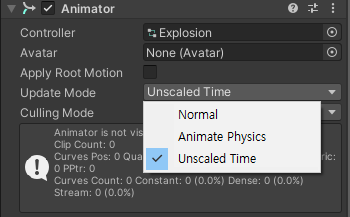
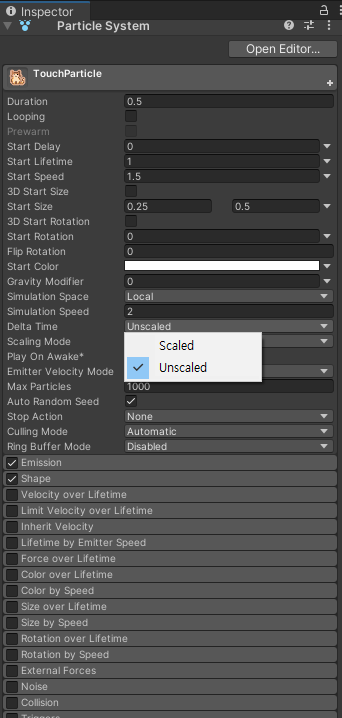
애니메이터와 파티클 또한 UnscaledTime 옵션이 존재한다.
시연 영상
화면 전환과 카드 파괴 풀링이 적용된 모습이다.
참고 :
https://www.youtube.com/watch?v=Ufa8cYKQeEo
유니티에서 일시정지 및 특정 물체 시간 정지 구현하기
Udemy 관련 개념 정리 및 Dev Log 를 기록하고 있습니다! 유니티에서 일시정지하기 유니티에서는 일시 정지 기능을 어떻게 구현하면 될까? 먼저 결론만 말하자면, Time.timeScale 값을 조절하여 Time.deltaT
koreanfoodie.me